> ## Documentation Index
> Fetch the complete documentation index at: https://docs.mesi.app/llms.txt
> Use this file to discover all available pages before exploring further.
# Influence Points
> Empower your favorite creators by delegating your platform influence and boosting their visibility.
**Influence Points** represent a user's "voting power" or "support weight" within the Mesi ecosystem. Unlike traditional social media likes, Influence Points are backed by a user's financial commitment to the platform. By allocating these points to a creator's gallery, fans directly boost that creator's [Engagement Rating](/path-to-engagement) and monetization potential.
## How Influence Points are Calculated
Your total Influence Points are a dynamic reflection of your platform stake. The system automatically combines your passive holdings with your active commitments.
$$Total\ Influence\ Points = \text{Holding Score} + \text{Locked \$MESI Amount}$$
* **Holding Score:** The 7-day rolling average of \$MESI tokens in your wallet.
* **Locked Amount:** The amount of tokens you have committed to [Monetization Tiers](/gamification/user-tiers-and-creator-limits).
***
## Allocation and Adjustments
Fans have total control over where their influence goes. You can support a single rising star or distribute your points across an entire portfolio of creators.
Influence points can be freely allocated, reallocated, or withdrawn from any gallery at any time without fees.
If your total point balance changes (due to buying or selling tokens), your existing allocations scale up or down automatically.
### Proportional Scaling Example
The system maintains your intended "support ratio" even as your token balance fluctuates.
> **Scenario:**
> You have **10,000 Influence Points** allocated as follows:
>
> * **Gallery A:** 4,000 points (40%)
> * **Gallery B:** 6,000 points (60%)
>
> If you sell tokens and your total points drop to **5,000**, the system maintains your 40/60 split:
>
> * **Gallery A:** Automatically reduced to **2,000**
> * **Gallery B:** Automatically reduced to **3,000**
***
## Strategic Impact
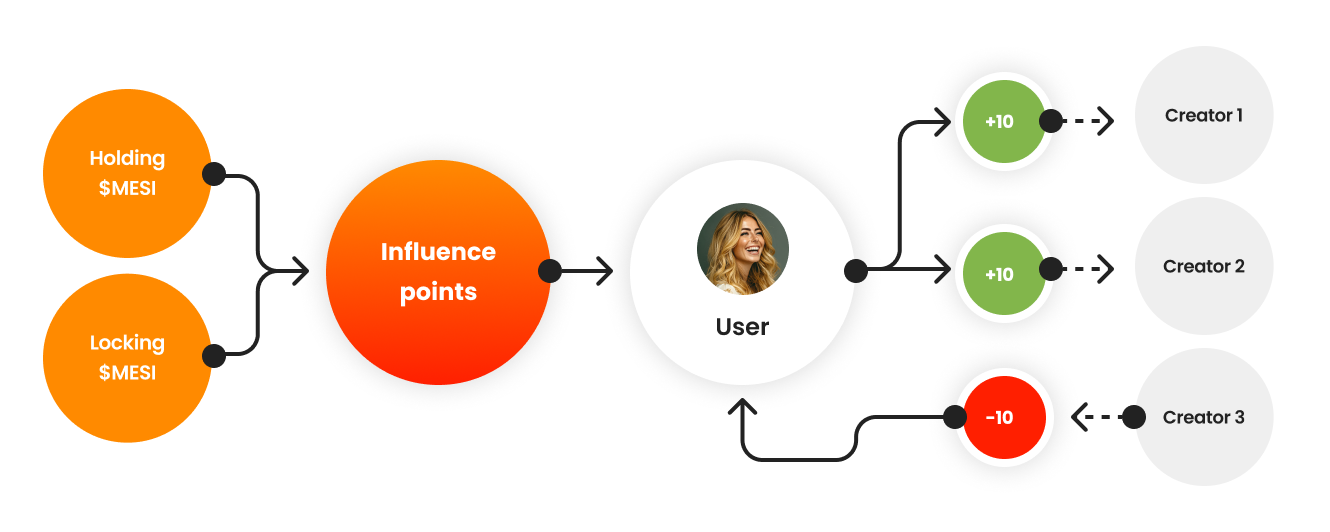 When you assign influence points to a gallery:
1. **Boosts Engagement:** It increases the creator's [Gallery Score](/path-to-engagement), making their content more likely to appear in trending feeds.
2. **Increases Rewards:** A higher Gallery Score leads to a larger share of the [Weekly Engagement Rewards](/path-to-rewards).
3. **Signals Trust:** Large amounts of delegated
When you assign influence points to a gallery:
1. **Boosts Engagement:** It increases the creator's [Gallery Score](/path-to-engagement), making their content more likely to appear in trending feeds.
2. **Increases Rewards:** A higher Gallery Score leads to a larger share of the [Weekly Engagement Rewards](/path-to-rewards).
3. **Signals Trust:** Large amounts of delegated